Abstract. Are robot endpoints secure in industrial environments? Current industrial security solutions monitor network interaction and detect unexpected traffic and cyber-threats. Robot-specific protocols and tools are commonly unknown to these solutions and, moreover, detection is far from what robots require since most are fully exposed to simple attacks according to recent research. Given the physical interaction these robots have with humans and our environments, attackers targeting robots should be blocked before interacting with their controllers, preventing safety hazards. Cybersecurity thereby becomes a strong pre-requirement to safety in robotics. Through a cooperation between Alias Robotics and Kaspersky, we launched a research effort to shed some light on the status of security for robot endpoints in OT environments. Our research showed evidence that simple attacks were feasible and that specialized security controls are necessary for capturing the complexity of modern robot interactions and preventing safety hazards. We deployed KICS and RIS, the Robot Immune System, on selected robots. RIS is a security-certified software solution that protects robots and robot components against malware: a Robot Endpoint Protection Platform (REPP). We confirmed how both solutions together successfully managed to protect and detect attacks targeting the robots.
Full text transcribed from the original publication source.
1Key terms and definitions
- Architecture dataflow: A diagram that displays and interrelates the different components, actors and assets that play a relevant role on a given system
- Attack library: A set of attack tools, either proof-of-concept code or fully developed (“weaponized”) exploit code that can help you understand the attacks.
- Attack surface: A trust boundary and a direction from which an attacker (often captures with another trust boundary) could launch an attack
- Attack tree: A method to find threats, a way to organize threats found with other building blocks, or both.
- Attack vector: An attack vector is a path that an attacker could follow to perform an attack on the system typically involving an entry point.
- Entry point: Specific areas in your architecture from where an actor could initiate attacks.
- Trust boundary: Anyplace where various principals come together—that is, where entities with different privileges interact.
- Threat: A risk that might exploit a vulnerability to breach security and therefore cause possible harm.
- Endpoint Protection Platform (EPP): an integrated suite of endpoint protection technologies that detects and stops a variety of threats at the endpoint.
- Information Technology (IT): the technology and use of computers to store, retrieve, transmit, and manipulate data or information throughout and between organizations.
- Kaspersky Industrial CyberSecurity (KICS): a holistic solution for industrial infrastructures.
- Operational Technology (OT): the technology that manages industrial operations by monitoring and controlling specific devices and processes within industrial workflows and operations, as opposed to administrative (IT).
- Robot Immune System (RIS): a security certified software solution that protects robots and robot components against malware. An EPP for robots.
- Robotics: A robot is a system of systems. One that comprises sensors to perceive its environment, actuators to act on it and computation to process it all and respond coherently to its application (could be industrial, professional, etc.). Robotics is the art of system integration. An art that aims to build machines that operate autonomously.
- Zero trust (ZT): A security model that makes no trust assumptions and demands strict identity verification for every person, device or component trying to access resources on a network,regardless of whether they are sitting inside or outside of the network perimeter
2Motivation
2.1Introduction
Robot cybersecurity reviews
More recent research
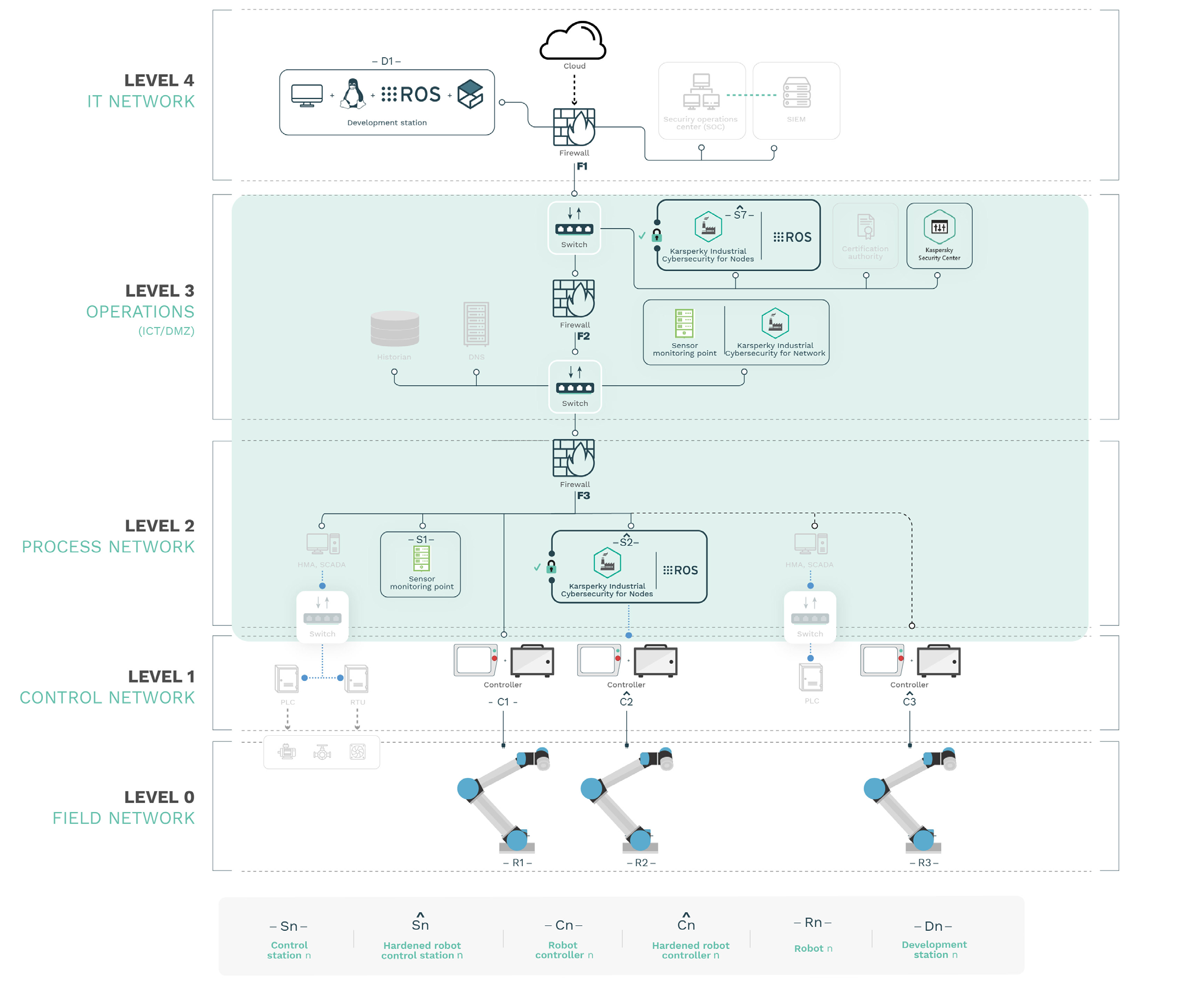
Figure 1. depicts the current landscape of OT environments when augmented with a security specific solution, namely Kaspersky’s Kaspersky Industrial CyberSecurity (KICS). KICS is able to monitor and detect security threats at the network level efficiently, complying with the demands of many industrial automation processes. However the robot endpoints, if present, are often left aside. As discussed in
2.2Safety standards in robotics require security
IEC 61508 “Functional Safety of Electrical/Electronic/Programmable Electronic Safety-related Systems” is a meta-standard for safety and from where most functional safety norms grow. This is the case for ISO 26262 (automotive), IEC 61511 (industrial processes), IEC 61513 (nuclear industry) or EN 50126/8/9 (railways), among others.
IEC 61508 indicates the following in section 7.4.2.3:
“If the hazard analysis identifies that malevolent or unauthorised action, constituting a security threat, as being reasonably foreseeable, then a security threats analysis should be carried out.”
Moreover, section 7.5.2.2 from IEC 61508 also states:
“If security threats have been identified, then a vulnerability analysis should be undertaken in order to specify security requirements.”
which translates to security requirements. Note these requirements are complementary to other security requirements specified in other standards like IEC 62443, and specific to the robotic setup in order to comply with the safety requirements of IEC 61508. In other words, safety requirements demand for security requirements, which are specific to the robot and influenced by security research. Periodic security assessments should be performed and as new vulnerabilities are identified, they should be translated into new security requirements.
“safety requirements demand for security requirements, which are specific to the robot and influenced by security research. Periodic security assessments should be performed and as new vulnerabilities are identified, they should be translated into new security requirements”.
More importantly, the fulfillment of these security requirements to maintain the robot protected (and thereby safe) will demand pushing the measures to the robot endpoint. To meet functional safety standards demand and prevent safety hazards from happening, the effective measures, along with networkbased monitoring solutions and endpoint protection for PC-based industrial hosts, should include a security mechanism that protects the robot endpoints, a Robot Endpoint Protection Platform (REPP).
To prevent safety hazards from happening, the effective measures should include a security mechanism that protects the robot endpoints, a Robot Endpoint Protection Platform (REPP)
In order to tackle these security requirements and protect robots from insideout, we will use the first instance of such REPP systems, namely, Alias Robotics’ Robot Immune System (RIS).
2.3Objectives and Goals
In light of the results of all these past studies and the requirements from standards, it appears that results do not favour the secure use of robots in OT environments today unless additional security measures are implemented.
The present study enhances a simplified version of the environment selected at
We will proceed as follows:
- We will describe in more detail the use case and all the components involved, including a short description of the virtualization used throughout the study to accelerate the production of results.
- We will then perform a series of attacks that will allows us to determine whether the proposed security mechanisms
- Finally, we will provide a series of recommendations for future work that will further optimize the overall security posture of OT environments and its lifecycle.
3Use case
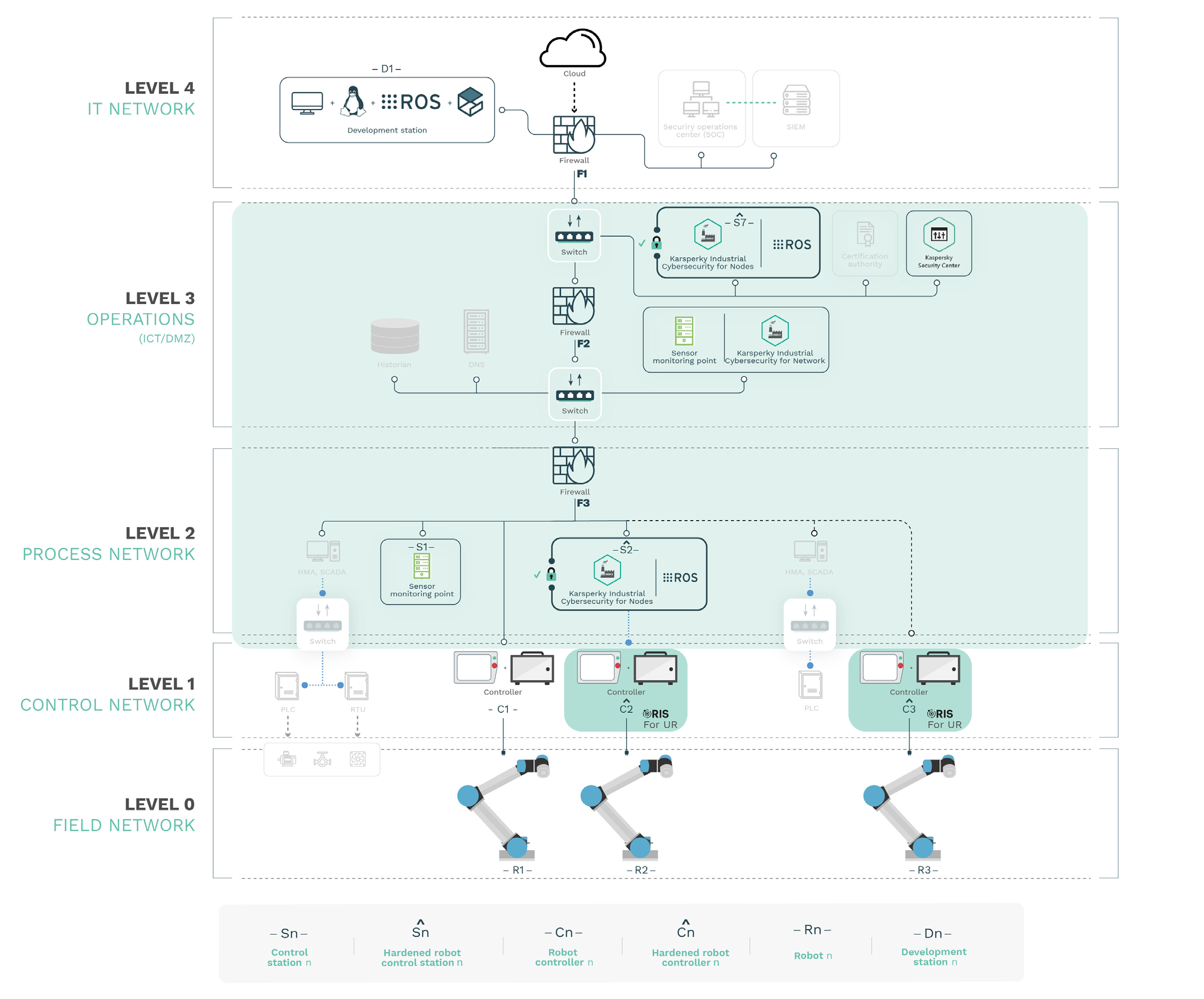
Figure 2. depicts the use case considered for this study which includes KICS and RIS cybersecurity solutions:
3.1Components
Robot Immune System (RIS)
The Robot Immune System (RIS) is a security certified software solution that protects robots and robot components against malware. Inspired by nature, it gets installed directly into the selected robotic system. More particularly, RIS is a Robot Endpoint Protection Platform (REPP), an integrated suite of endpoint protection technologies for robots —including a next-gen antivirus, hardening for known flaws, data encryption, intrusion prevention mechanisms, data loss prevention, etc.— that detects, prevents, stops and informs on a variety of threats that affect the robotic system. Its main capabilities include:
An adaptive firewall that blocks unexpected communications. Simple adaptation on-the-go.
Robot-specific hardening. Enforces security policies, patches known vulnerabilities and removes unnecessary communications, often left in robotic systems for development or debugging purposes.
Secure logging. A forensics-oriented module that registers and records all incoming communications and internal interactions.
A robot-specific visualization module that allows seamless interaction with RIS. Re-train and control the security notifications with and within the robot.
A series of machine learning techniques grouped as an Artificial Immune System (AIS) that continuously adapt the response of RIS to incoming security threats.
Kaspersky Industrial CyberSecurity (KICS)
Kaspersky Industrial CyberSecurity (KICS) is a holistic solution for industrial infrastructures. The solution consists of three components:
KICS for Nodes – a component for industrial network endpoint protection (such as engineering stations, operator stations, SCADA servers)
KICS for Networks – a component for industrial network monitoring with network integrity checking and deep application protocol inspection capabilities (IEC 60870-5-104, IEC 61850, etc. for electric power infrastructures
Kaspersky Security Center – a centralized security management software that provides capabilities for systems management, policy management, reporting, notification and SIEM integration.
The three components are treated in more detail below:
Kaspersky Security Center
From
KCS provides the following functionality:
Systems management Centralized system data collection Centralized software deployment Vulnerability detection & patch management Extended client management capabilities
Policy management Centralized security policy management Remote task scheduling and execution
Reporting and notification Event logging Dashboards and reports SMS/Email notifications
SIEM integration ArcSight, Splunk, QRadar Syslog Server
In addition, KSC supports centralized deployment and management of the several Kaspersky Lab applications
One must note that KSC is aimed at basic administration and maintenance tasks of the overall Kaspersky ICS deployment but it is not a requirement for the use of individual selected applications. This being the case, for simplicity, we decided NOT to use KSC within our setup.
Kaspersky Industrial CyberSecurity for Networks
According to
Asset discovery. Passive OT assets identification and inventory
Deep packet inspection. Almost real-time technical process telemetry analysis
Network integrity control. Detects unauthorized network hosts and flows
Intrusion detection system. Alarms signs of offensive network actions
Command control. Inspects commands over industrial protocols
External systems. External detection technologies API integration
Machine learning for anomaly detection (MLAD). Finds cyber or physical violations through real-time telemetry & historical data mining (Recurrent Neural Network)
The API for interacting with KICS for Networks is available at
Kaspersky Industrial CyberSecurity for Nodes
Kaspersky Industrial CyberSecurity for Linux Nodes (or KICS for Nodes)
ID             Task name                                              Description
                                              Description

 1         File Threat                  File Threat Protection task prevents infection of the file sys-
           Protection                   tem of the computer. The task resides in the computer’s RAM
                                        and scans all opened, saved, and active files.
2          Virus scan                   A virus scan is a one-time full or custom scan of files on a
                                        computer performed by Kaspersky Industrial CyberSecurity for
                                        Linux Nodes.
3          Custom scan                  Similar to “Virus scan” but targeted to specific files.

4          Boot sector s                Boot sector scan task lets you scan boot sectors while not
           can                          specifying a scan scope.
5          Process memory               Process memory scan task lets you scan the process memory
           scan                         and kernel memory while not specifying a scan scope.
6          Update                       Updating the databases and application modules of Kaspers-
                                        ky Industrial CyberSecurity for Linux Nodes to ensure up-to-
                                        date protection on your computer.
 7         Rollback                     A task that helps to roll back the databases to their previous
                                        versions.
8          License                      Manage Kaspersky Industrial CyberSecurity for Linux Nodes
                                        keys and activation codes
9          Storage                      Storage is a list of backup copies of files that have been deleted
           management                   or modified during the disinfection process. Backup copy is a
                                        file copy created at the first attempt to disinfect or delete this
                                        file. Backup copies of files are stored in a special format and
                                        do not pose a threat.
10         System Integrity             The System Integrity Monitoring task is designed to track
           Monitoring                   actions performed with the files and directories in the
                                        monitoring scopes specified in the task settings.
11         Firewall                     Firewall Management detects all network connections of the
           Management                   user’s computer and provides a list of IP addresses, as well as
                                        an indication of the status of the default network connection.
12         Anti-Cryptor                 The Anti-Cryptor task allows you to protect your files in the
                                        local directories with network access by SMB/NFS protocols
                                        from remote malicious encrypting.
13         Web Threat                   Scans the inbound traffic and prevents downloads of malicious
           Protection                   files from the Internet while also blocks malicious, phishing,
                                        adware, or other dangerous websites.
14         Device Control               Manages user access to devices that are installed on or
                                        connected to the computer (for example, hard drives, smart
                                        card readers, or Wi-Fi modules).
15         Removable drivers            Scans a connected device and its boot sectors for viruses
           scan                         and other malware. The following removable drives may be
                                        scanned: CDs, DVDs, Blu-ray discs, flash drives (including USB
                                        modems), external hard drives, and floppy disks.
16         Network Threat               Scans inbound network traffic for activity that is typical of
           Protection                   network attacks. Particularly, this task scans inbound traffic
                                        only for 80, 139, 445, and 8080 TCP ports.
17         Container scan               Scans Docker containers, images, and name spaces for viruses
                                        and other malware.
18         Custom Container             Scans Docker containers and images for viruses and other
           scan                         malware. You can run multiple custom Container Scan
                                        tasks simultaneously. A custom Container Scan uses the
                                        same parameter values as “Container_Scan”, except for the
                                        parameter ScanPriority=Normal. The custom task does not
                                        scan name spaces.
19         Behavior Detection The Behavior Detection task monitors malicious activity in
                              the operating system. If the malicious activity is detected,
                              Kaspersky Industrial CyberSecurity for Linux Nodes terminates
                              that process.


KICS for Linux Nodes can be managed by using the following methods:

         From the command line using the application control commands [6].

         Via Kaspersky Security Center.

Using graphical user3.2Endpoint components and security configurations
PLC                                                         Robot


  PLC                                                             Robot n (Rn)
  A Programmable Logic Controller (PLC) or                        The robot (generally only the mechanical side of it and
  programmable controller is an industrial digital                the embed sensors). In this case, given the use case the
  computer which has been ruggedized and adapted                  robots will represent CB3.1 series Universal Robots robots
  for the control of manufacturing processes. PLCs                (UR3s, UR5s or UR10s). Communication with the controller
  operate such as assembly lines, or robotic devices,             happens over an industrial bus. No security measures are
  or any activity that requires high reliability, ease of         enabled within the hardware as far as our inspection went.
  programming and process fault diagnosis. PLCs are
  connected to sensors and actuators in the control
  process and are networked to the supervisory                                                 Hardware:
  system (SCADA). In factory automation, PLCs                                                  UR3, UR5 or UR10
  typically have a high speed connection to the SCADA
  system. In remote applications, such as a large                                              Entry points:
  water treatment plant, PLCs may connect directly                                              Fieldbus
  to SCADA over a wireless link, or more commonly,                                              Physical attacks
  utilise an RTU for the communications management.
                                                                                               Security measures:
  PLCs are specifically designed for control and                             R2                None
  were the founding platform for the IEC 61131-3
  programming languages.
Robot controller
Robot controller n (Cn) Hardened robot controller n (Cn)
The robot controller accessible locally via physical A hardened version of the robot controller. The
means (e.g. USB ports or Ethernet ports) or its hardening is implemented via the deployment of the
local network connections. A simulated version of Robot Immune System (RIS) and includes patches
the robot controller will be developed to speed up for known flaws in the controller’s services and
testing. Such simulation will be used throughout the processes, strict access control, an embedded
exercise and will expose the same services (with the adaptative firewall, an Intrusion Detection System
same software versions) and networking ports that (IDS), a secure logging mechanism, and a series of
the real robot controller does. The controller includes techniques that learn from usual interactions (by
by default no security measures enabled. It must be capturing network and system’s information) while
noted that past work reported several flaws affecting developing a pattern for detecting common and
this controller which have yet to be patched. Each uncommon behaviors.
controller is assumed to run firmware version 3.13.0
from Universal Robots.
Hardware:
Universal Robots controller
CB3.x
Hardware: Entry points:
Universal Robots controller Teach pendant (hardened)
CB3.1 Ethernet port (hardened)
USB port (in the teach pendant)
Entry points: + (hardened)
+
Teach pendant Local area network (filtered)
Ethernet port
USB port (in the teach pendant) ROS driver: None
Local area network
Security measures:
Access control, security
Security measures: patches, IDS, adaptative IDS,
None secure logging, network filtering
Control station
Control station n (Sn) Hardened control station n (Sn)
Linux-based control station from where to operate A hardened Linux-based control station from
the robot controller (and coherently, the robot where to operate the robot controller (and
mechanics). The station will be based on Ubuntu coherently, the robot mechanics). The station will
Bionic (18.04 LTS), include ROS Melodic Morenia be based on Ubuntu Bionic (18.04 LTS), include
and the ROS Industrial drivers for Universal ROS Melodic Morenia and the ROS Industrial
Robots, communicating with the robot controller drivers for Universal Robots, communicating
via a local area network. No wireless connectivity with the robot controller via a local area
is assumed. Control stations are simulated with network. Security measures applied follow the
limited resources. Particularly, we assign each 4 recommendations of Canonical’s report on how
CPUs and 4096 MB of RAM. Beyond the defaults, to secure ROS robotics platforms in Ubuntu
no particular security measures are applied into Bionic 18.04 Linux distribution. On top of these
the control stations. measures, the configuration of the hardened
stations was further enhanced using. No wireless
communications are assumed to be enabled in the
hardened controls stations.
Hardware:
Industrial-grade PC
CPU: 4 cores Hardware:
RAM: 4096 MB Industrial-grade PC
CPU: 4 cores
Entry points: RAM: 4096 MB
Physical access (digital I/O,
Control
local area network interfaces, storage Entry points:
devices, etc.)
station Physical access (digital I/O,
Local area network local area network interfaces, storage
devices, etc.)
Control
ROS driver: station Local area network
ur_modern_driver
Universal_Robots_ROS_Driver ROS driver:
ur_modern_driver
Security measures: Universal_Robots_ROS_Driver
None
Security measures:
See sections below for more
details.Central control station Development machine
Central control station n (Cn)
Development station n (Dn)
Linux-based central control station from where
to command other ROS-enabled enpoints (such Linux-based development station from where
as the ROS drivers enabled on each sub-control to develop additional features, monitor and/
station). The station will be based on Ubuntu Bionic or introspect the robotic setup. The station will
(18.04 LTS), include a ROS Melodic Morenia and be based on Ubuntu Bionic (18.04 LTS), includes
ROS-Industrial packages, communicating with the ROS Melodic Morenia, Gazebo 9 and the ROS
robot controller via a local area network. Technical Industrial drivers for Universal Robots. A Gazebo
specifications and security measures of the central simulated instance of the robot will be used for
control station are the same as of hardened control development purposes. Beyond the defaults, no
stations Sˆ n above. The central control station particular security measures are applied into the
is assumed unique in the networking setup and development station.
wherein the ROS Master process will be running (in
other words, all other ROS-enabled machines will Hardware:
be acting as slaves). General purpose PCCPU:
CPU: 4 cores
RAM: 4096 MB
Hardware: Entry points:
Industrial-grade PC Physical access (digital I/O,
+ + local area network interfaces, storage
CPU: 4 cores devices, etc.)
RAM: 4096 MB Development station Local area network
Entry points: ROS driver:
Physical access (digital I/O, ur_modern_driver
local area network interfaces, storage
devices, etc.) Universal_Robots_ROS_Driver
Control Local area network
station
Security measures:
ROS driver: None
ur_modern_driver
Universal_Robots_ROS_Driver
Security measures:
See sections below for more
details.3.3Virtualization
Due to the expensive price of building a complete real industrial setup including the control stations, controllers, robots, HMIs, PLCs and other equipment, frameworks started appearing which propose a high-fidelity computer virtualization designed to support rapid, parallel experimentation with the automated design of software agents in mind. By leveraging virtualization, we can create a high-fidelity clone of the OT environment. With this security researchers can distribute the work and perform experiments to see how the environment and its security measures respond to certain kinds of attacks.
Virtualization is a commonly used technique in other areas allowing developers and security practitioners to more easily test, reuse and ship systems. When using virtualization, there are often two approaches, emulation and simulation. Emulation is generally implemented through hardware-virtualization, typically using full-virtualization with type two hypervisors (e.g. VirtualBox, VMWare Workstation or QEMU), commonly referred to as Virtual Machines (VMs). This provides complete isolation between guest kernels and the host, while allowing to run many different operating Systems (OS) within the same physical host.
Simulation is often implemented with simpler abstractions such as state machines or through OS-virtualization, using a shared kernel across both the host and guests. OSvirtualization is typically referred to as “containers” in Linux, and is widely considered the most efficient virtualization method for its highest performance and fastest “start-up” time.
In this study we use the alurity toolbox
For simplicity and focus, the virtual environment does not include KSC. As noted above, KSC is focused on basic administration and maintenance tasks across Kaspersky Lab applications. Since the purpose of this exercise is to test and evaluate the security offered by KICS in relation to the robotic endpoints only KICS for Networks and Nodes have been used.
4Attacking an OT environment with robots
In order to analyze the security of the robotic endpoints, the following subsections describe different attack vectors considered on the synthetic OT environment constructed Figure 2.
4.1Attack vector 1: Process network insider
In this vector we consider a path that begins from an attacker with access to a machine that has network connectivity with endpoints in the Process Network (Level 2). This could be a device either inside of the Process Network itself or in any other segment with the capability of reaching the Process Network. Details of the particular entry point and method for scaling privileges to gain network capabilities on it are beyond the scope of this study.
In our proof-of-concept attack, the attacker leverages RVD#1489 and launches an exploit that exfiltrates intellectual property.
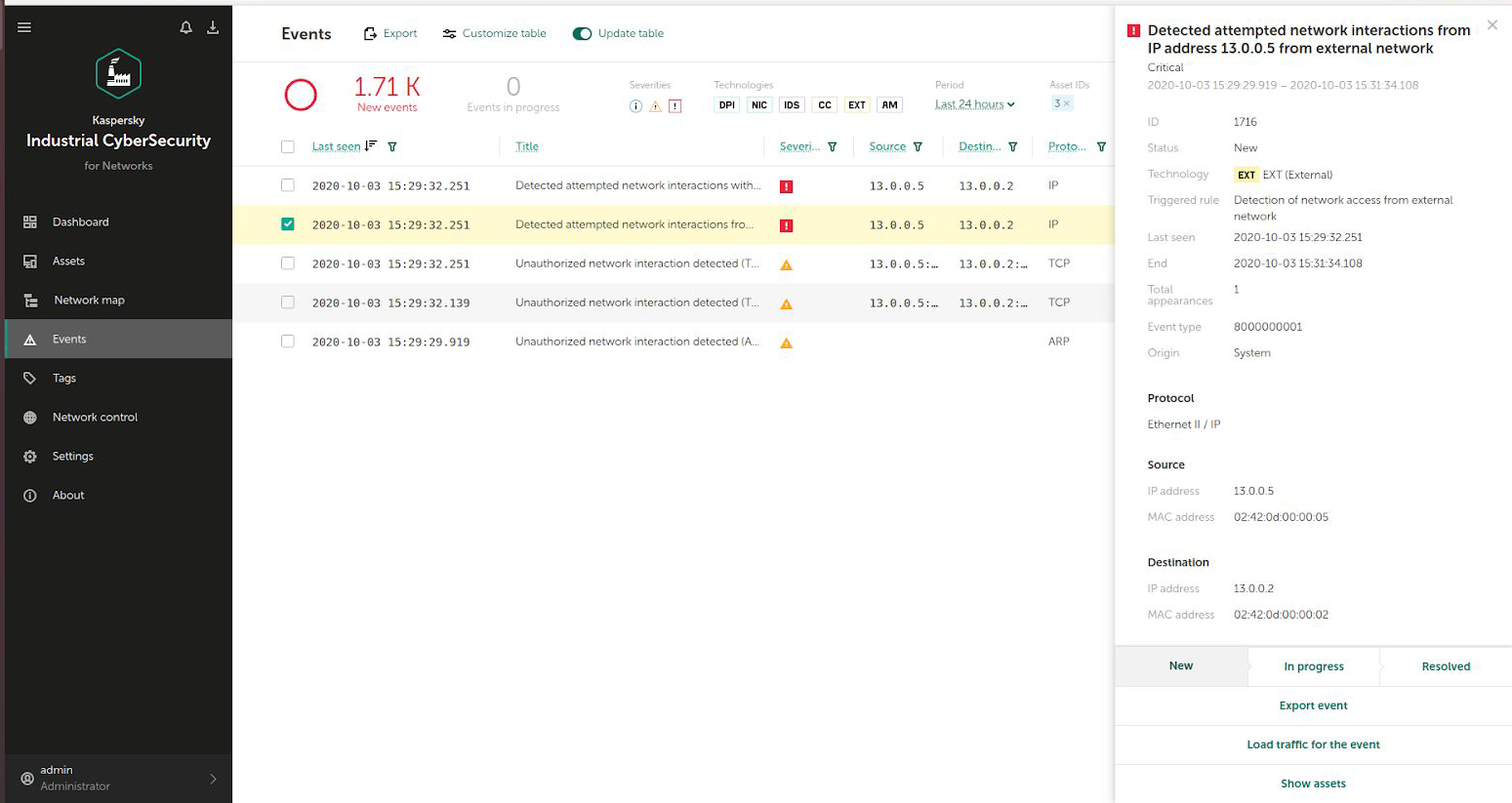
KICS for Networks was previously trained (in Learning mode) and configured to monitor the network (in Monitoring mode). Correspondingly, since there’s a KICS sensor placed in that Process Network segment, KICS for Networks successfully manages to detect the unusual behavior and raises an event indicating “Detected attempted network interactions from IP …”. The attacker is able to retrieve the intellectual property leveraging vulnerability RVD#1489. The following trace retrieved from KICS from Networks shows this particular network exchange:
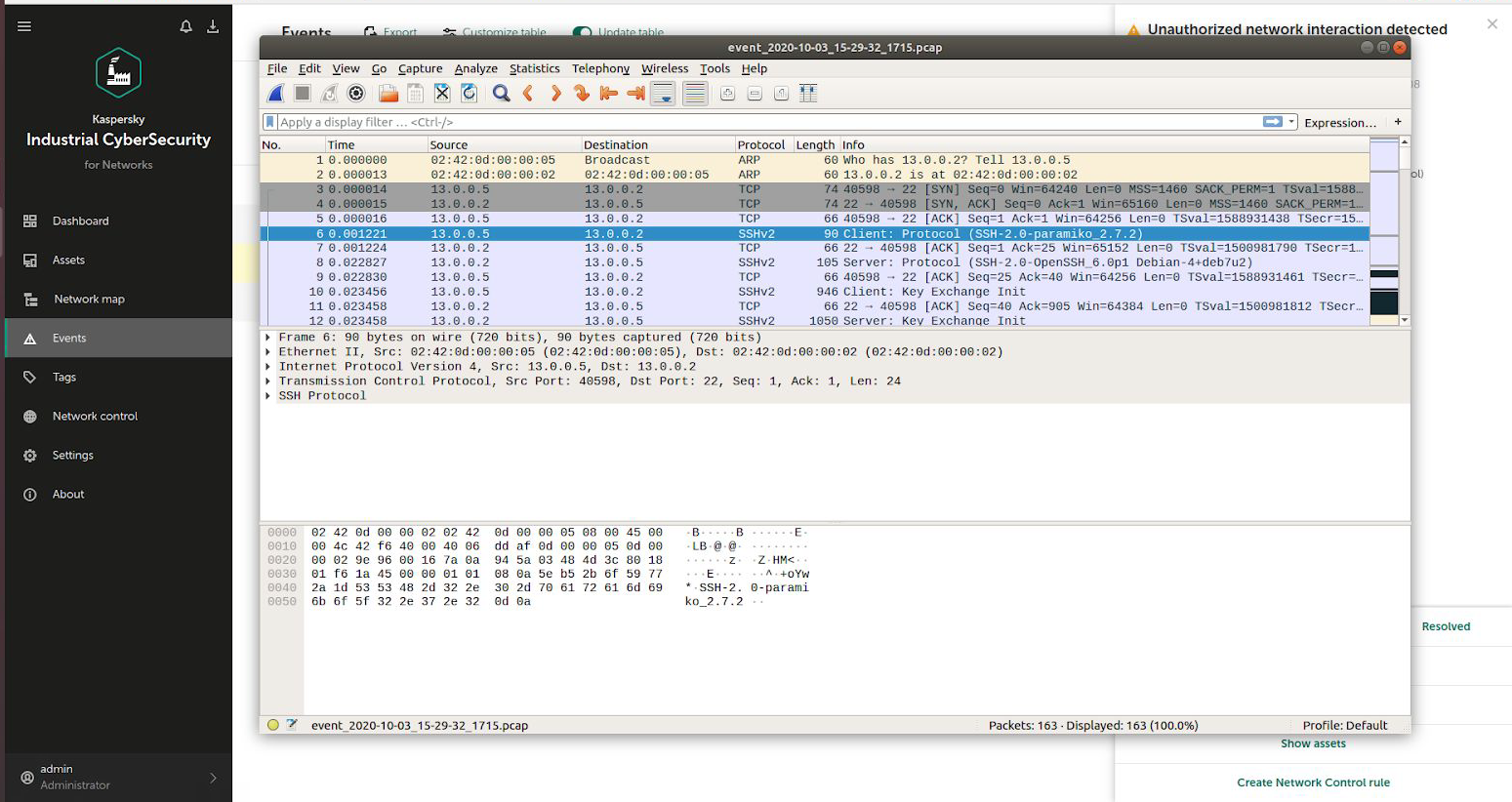
The same situation was confirmed with other vulnerabilities affecting the selected robotic endpoints including RVD#1406, RVD#1410, RVD#1412 or RVD#1413, among others.
Based on these results we argue that in order to not only detect timely but also to prevent network attacks on robotic endpoints and safety, additional security solutions should be in place which demands for additional security solutions
4.2Attack vector 2: Controller insider
In this attack vector we consider a compromised controller that includes no additional security measures. In particular, we assume the attacker compromises C1 as depicted in Figure 5.:
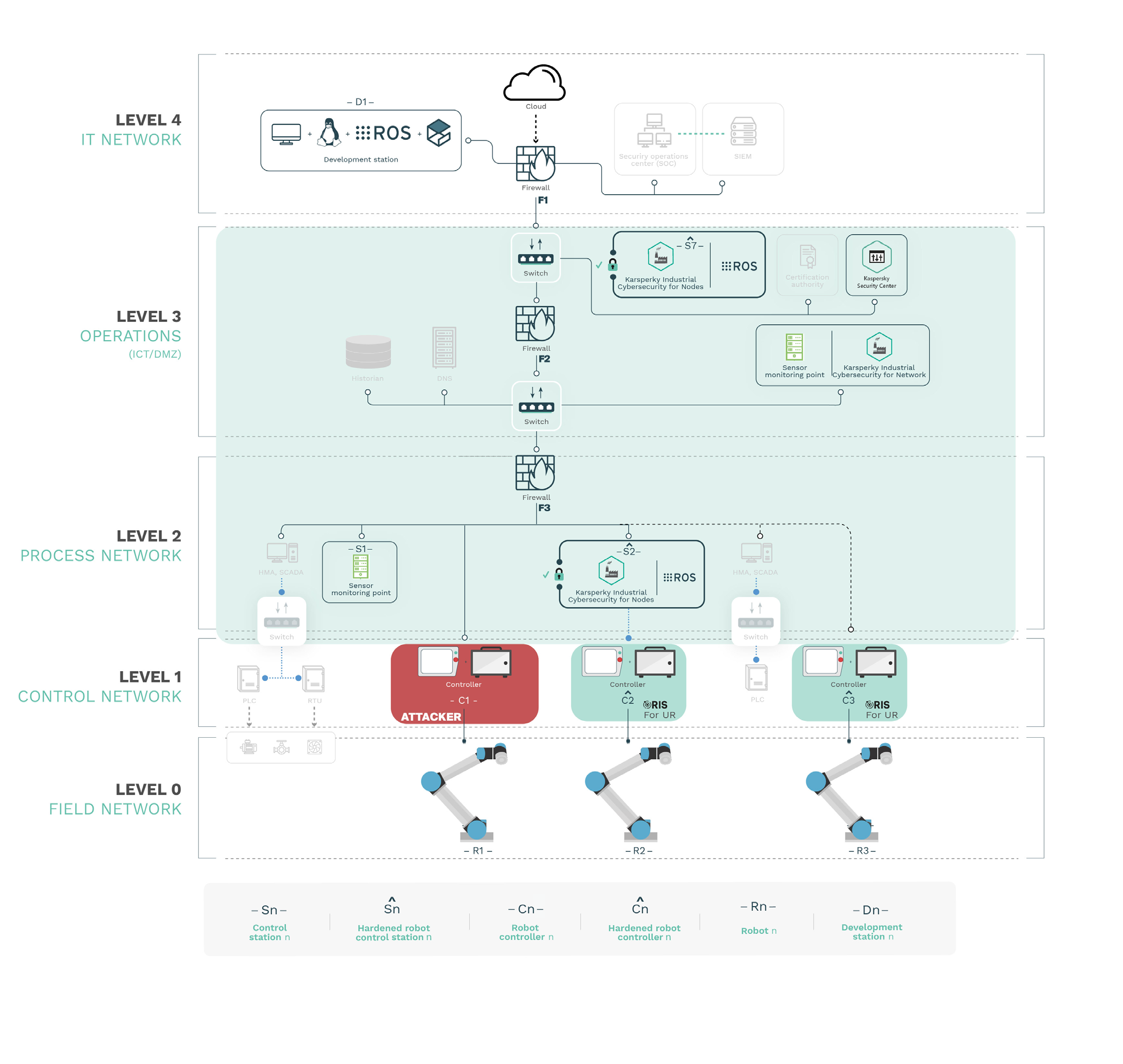
Compromising C1 can happen in a variety of ways and either by exploiting known and previously mentioned network vulnerabilities (while moving laterally) or by leveraging other flaws including the widely known RVD#672 or RVD#1408, an attacker could easily gain control of C1 with root privileges. From this point on, the robot could be commanded as desired and safety could be compromised easily.
In our case KICS for Networks has no sensors installed at the Level 2 network, and doesn’t monitor traffic coming out of robot controllers towards the robot mechanics and control stations and is thereby unable to detect attacks that originate from the following endpoint pairs of our environment affecting control stations, controllers and robots: S2-C2, C2-R2, C3-R3
The lack of sensors monitoring traffic coming out of robot controllers needs to be complemented with additional solutions that protect robot endpoints. That’s where Alias Robotics’ RIS comes to play
Access to the controller implies complete control of the robot in most cases. The lack of security measures in robot controller endpoints, together with no detection capabilities makes them an interesting target for attackers, especially given their strategic value in an OT production environment. Attackers will leverage these weaknesses to deploy malware targeting robots. An example of such was illustrated in
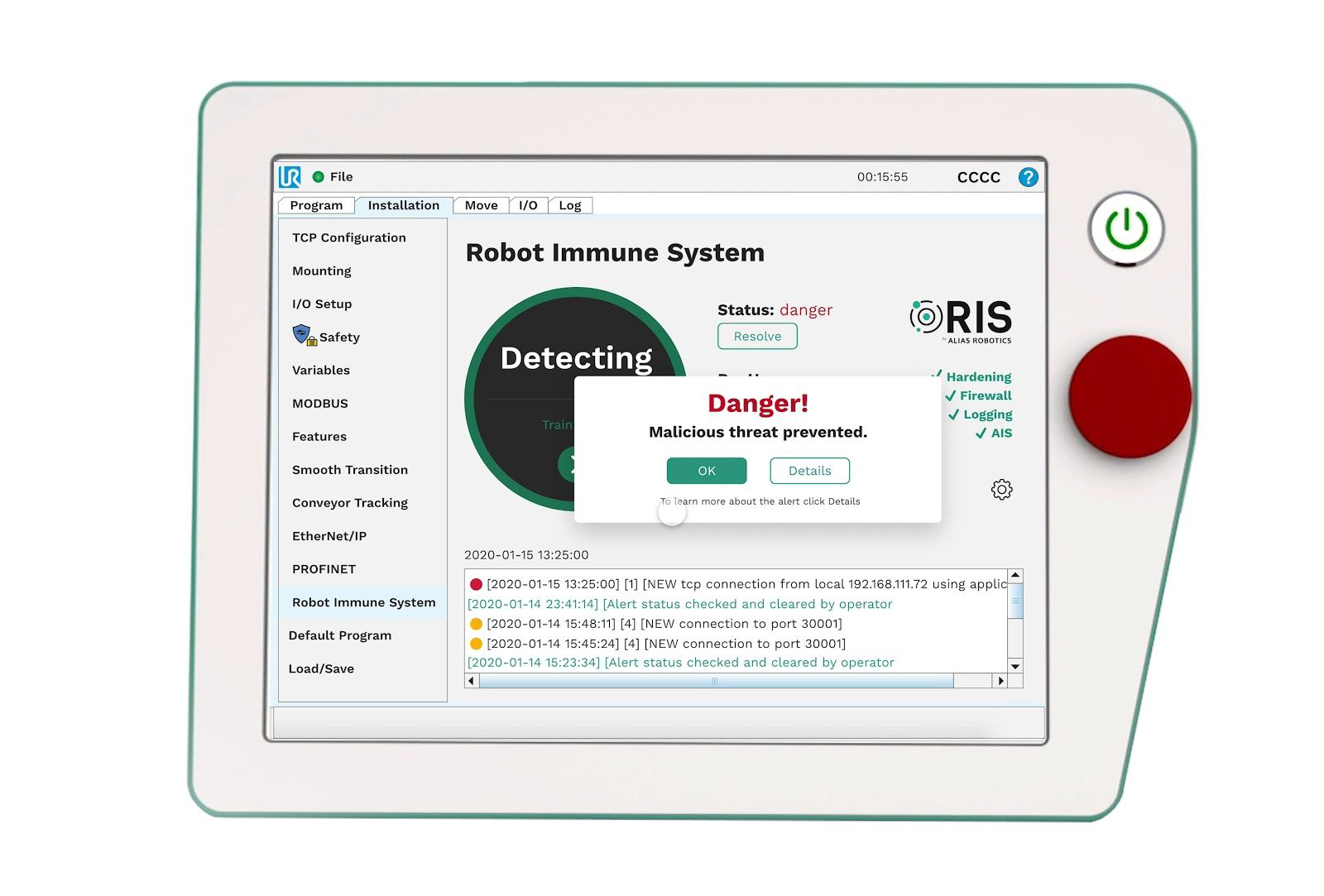
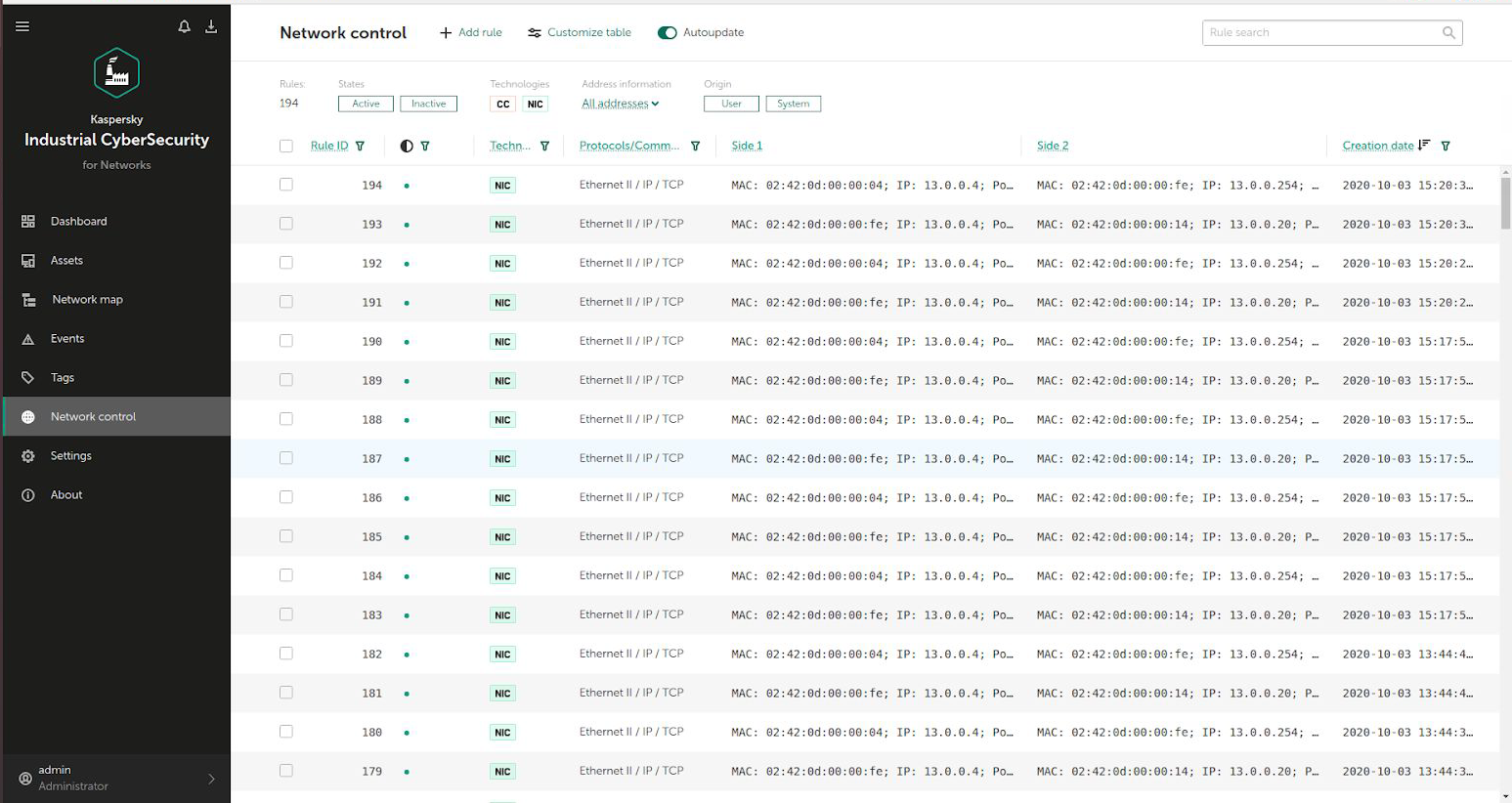
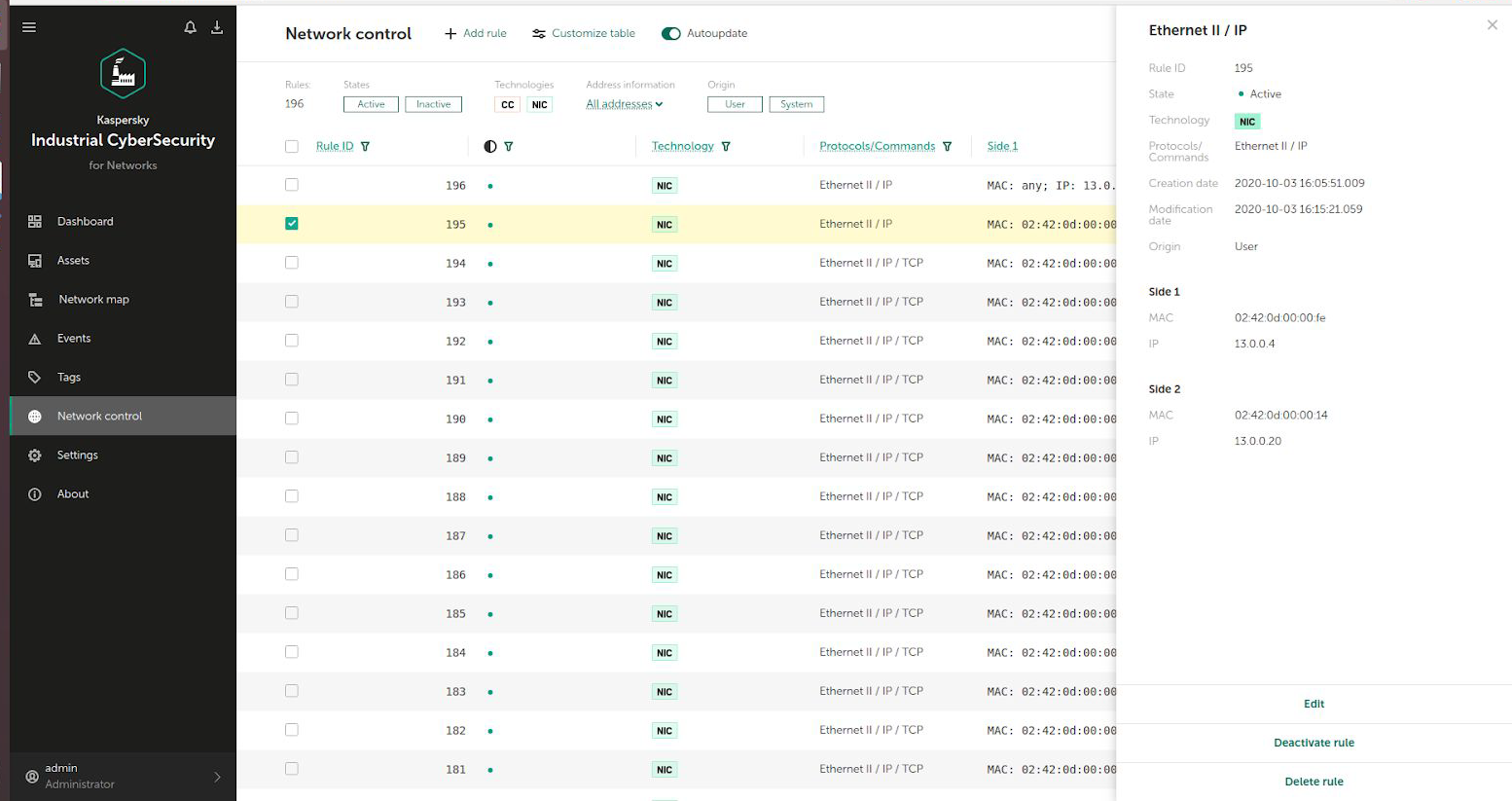
Based on the evidence collected, it becomes clear the need of securing the robot controllers. This was validated by RIS deployed in C2 and C3, protecting them proactively and deploying security measures directly at the controller endpoint. With RIS, robot controllers C2 and C3 remained resilient to the same attacks, preventing any safety hazards while informing operators of any suspicious activity as illustrated in Figure 6.
With RIS complementing KICS, robot controllers C2 and C3 remained resilient to the same attacks, preventing any safety hazards
4.3Attack vector 3: Compromising the ROS network
The Robot Operating System (ROS)
ROS was not designed with security in mind, but as it started being adopted and deployed into products or used in government programs, more attention was placed on it however, at the time of writing, none of the past security efforts remain actively maintained and no official ROS security solution exists today. Moreover, recent research reports
With the advent of ROS in industry and professional use, security of ROS networks becomes a relevant matter. We deployed a ROS network in our scenario Figure 2. wherein S7 acts as the ROS Master and other stations, including S2 (both hardened by KICS for Nodes) act as slaves deploying ROS nodes. Figure 7. depicts a simplified ROS computational graph where the interactions between the ROS Master and the ROS Slave APIs are illustrated.
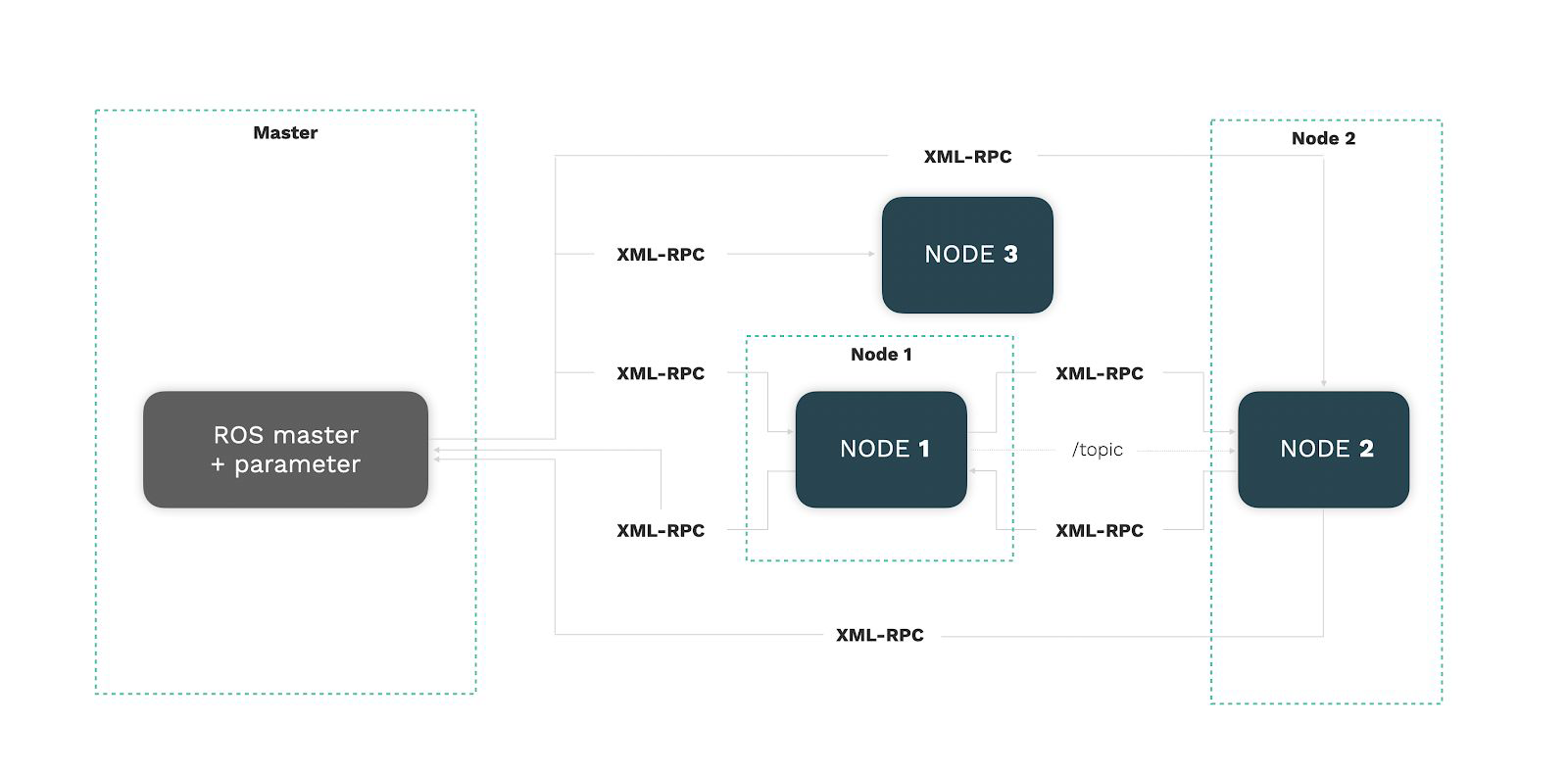
In ROS, nodes intercommunicate through an API (the ROS API) via XML-RPC, a remote procedure call protocol using XML encoding, as well as message/service data exchanges using transport libraries such as ROSTCP or ROSUDP for serialization over IP sockets. All network traffic is transmitted in clear text and in addition, no integrity check is performed on received. Overall, this makes ROS a target for packet sniffing and manin-the-middle attacks, resulting in an absence of native network confidentiality and data integrity.
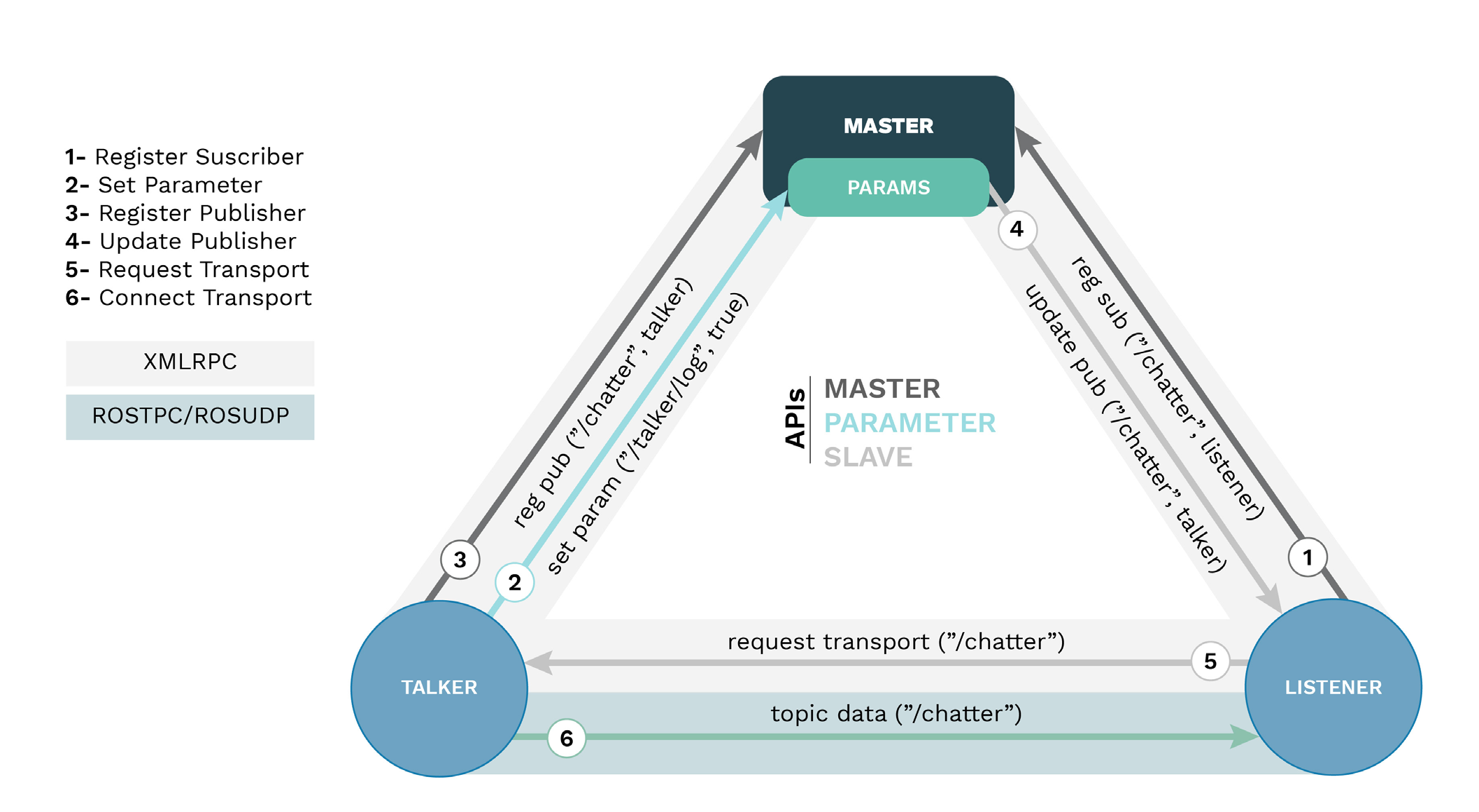
The ROS communication model imposes strong restrictions on how network interaction between nodes work and the exchange of data between both. More particularly, the ROS API (Master, Slave and Parameter sub-APIs) via XMLRPC followed by the UDP or TCP sockets (through ROSUDP or ROSTCP transport libraries) require network visibility between each nodes and the Master, as well as between endpoints exchanging data. Figure 8. depicts this while showing a simple talker/listener example, common in the ROS community.
To date KICS doesn’t support the dynamic nature of the ROS networks (new connections on arbitrary TCP/UDP ports). The support will be considered in the future work, that might include a deep packet inspection module for ROS communications in KICS for Network and a submodule in KICS for Nodes that leverages the ROS API, becoming a first class participant of the ROS computational graph and thereby becoming capable of relying relevant information to the centralized security core for autonomous rule generation on-the-go. Such an approach was implemented as part of the RIS for ROS solution available for Kinetic Kame and Melodic Morenia distros
It is technically non-trivial to protect ROS Networks via host-based firewalls or network monitoring solutions. The rules generated by KICS while ‘Learning’ are mostly static and do not capture the complexity of the ROS computational graph. Future versions of KICS might extend the current capabilities in a follow up collaboration.
5Conclusions and future work
The results acquired through past sections led us to conclude that the combination of the Robot Immune System (RIS, on each robot endpoint) together with the Kaspersky Industrial Cybersecurity (KICS) managed to jointly secure robot endpoints in OT environments.
KICS (and particularly KICS for Networks and Nodes) qualifies nicely as an industrial-grade solutions to monitor environments with robotic endpoints; however beyond monitoring general industrial networks, additional security means must be used in combination with KICS to prevent robots from being compromised and cause safety hazards. We confirmed this with attacks targeting robot controllers and ROS networks. We also verified that the addition of RIS as a complementary solution successfully protects robot endpoints, mitigating the cybersecurity flaws of the selected robot endpoints and fulfilling the safety requirements.
the addition of RIS as a complementary solution (to KICS) successfully protects robot endpoints, mitigating the cybersecurity flaws of the selected robot endpoints and fulfilling the safety requirements.
We collected evidence in a synthetic scenario and shared implementation details in Appendix A. From all of it, we learned the following:
KICS for Networks succesfully detects network attacks, even those targeting robotic endpoints if the attack uses a channel sensed by KICS.
KICS for Nodes hardens control stations successfully and prevents them from being affected by attacks. ROS can be embedded into such hardened-stations.
RIS enhancing KICS prevents attacks and protects robot endpoints.
RIS for UR protects the robot endpoints against targeted attacks and can be used in combination with KICS for securing OT environments with robot endpoints.
The protection of ROS networks requires an extension of KICS for Networks that grasps the complexity of the ROS API. RIS for ROS follows such an approach and delivers an alternative protection for control stationsagainst targeted attacks.
The general posture of KICS aligns nicely with the specific characteristics of RIS. Note that RIS is available for different robots and robot components, always targeting specific versions. At the time of writing the following options are publicly available for robot endpoints:
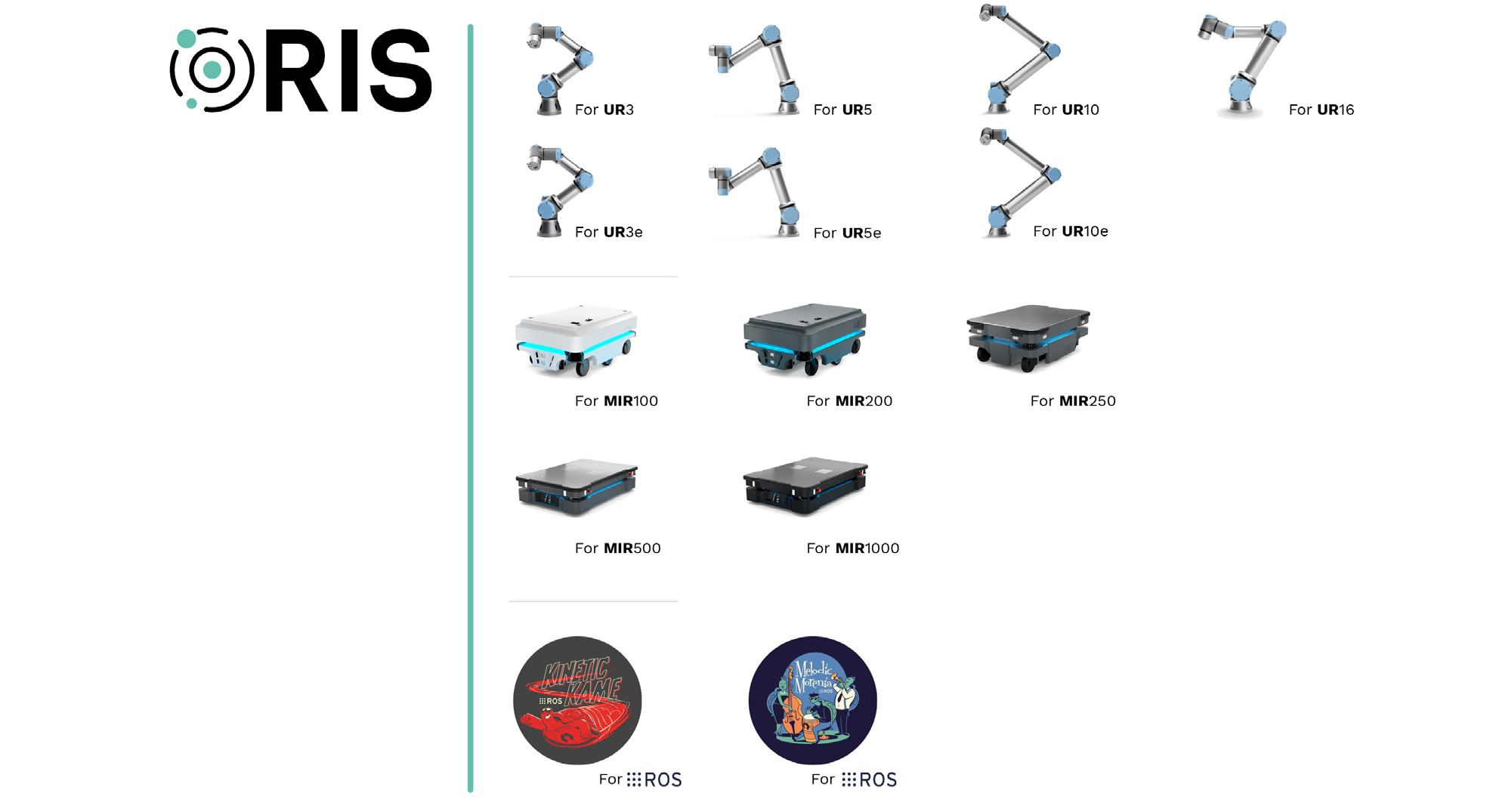
For each one of these endpoints, RIS provides a security-in-depth solution that collects a significant amount of information, currently not being pushed to a centralized security management system. Future work may look into this aspect and leverage this information at the endpoint for an overall enhanced security posture.
Figure 11. summarizes the synthetic OT environment studied and includes some additional interactions specific to KICS, as well as some desired communication paths between KICS and RIS for enhanced security.
Aligned with these thoughts of an enhanced security posture, future research may focus on the following items:
- Interoperability between RIS and KICS for Nodes to harden the communication paths in between control stations and controllers.
- Interoperability between RIS, KICS for Nodes and KICS for Networks to register network interactions without the need of placing additional endpoint-specific KICS sensors.
- Security management of RIS via KSC to deliver updates, patches and new vulnerability mitigations.
- Integrate RIS for ROS into KICS for Nodes, enabling KICS to secure ROS computational graphs.
Appendix AAppendices
A.1Appendix A: Alurity YAML file to reproduce the use case
  1  # This file allows to reproduce the scenario used for the study titled as
  2  # “Securing robot endpoints in Operational Technology (OT) environments” which
  3  # studies how arbitrary robot endpoints are affected by known malware and how
  4  # existing industrial security mechanisms need to be extended to detect and
  5  # stop these new security threats.
  6  #
  7  # To launch it:
  8  # alurity start -- --privileged ; alurity enter --user root; alurity stop
  9  # or:
 10  # alurity flow --user root --kill; alurity stop; alurity start -- --privileged; alurity flow --user root
 11  #
 13  ############
 14  # Networks
 15  ############
 16  networks:
 18  # Level 0: Field Networks
 19  # for each robot-controller pair, there should be a field-level network
 20  # however in the context of this study, they won’t be used.
 22  # - network:
 23  # - name: field-network_r1_c1
 24  # - driver: overlay
 25  # - internal: true
 26  # - encryption: false
 27  # - subnet: 11.1.0.0/24
 28  # - network:
 29  # - name: field-network_r2_c2
 30  # - driver: overlay
 31  # - internal: true
 32  # - encryption: false
 33  # - subnet: 11.2.0.0/24
 34  # - network:
 35  # - name: field-network_r3_c3
 36  # - driver: overlay
 37  # - internal: true
 38  # - encryption: false
 39  # - subnet: 11.3.0.0/24
 41  # Level 1: Control Networks, connect controllers and control stations
 42  # for each controller, we expect a dedicated control-network
 43  - network:
 44  - name: control-network_c2_s2
 45  - driver: overlay
 46  - internal: false
 47  - encryption: false
 48  - subnet: 12.2.0.0/24
 50  # Level 2: Process Network, where dedicated control stations and robots
 51  # interconnect for automation of processes
 53  # # overlay version, isolating it from the rest
 54  # - network:
 55  # - name: process-network
 56  #   - driver: overlay
 57  #   - internal: true
 58  #   - encryption: false
 59  #   - subnet: 13.0.0.0/24
 61  # bridge version, to interface with VMs
 62  - network:
 63  - name: process-network
 64  - driver: bridge
 65  - subnet: 13.0.0.0/24
 67  # Level 3: DMZ 2 sub-network
 68  # NOTE: used used to interface Process Network with machines in DMZ 2
 69  # (e.g. KICS for Networks, Sensor nodes, a historian, additional servers and related)
 71  # - network:
 72  # - name: dmz2
 73  # - driver: overlay
 74  # - internal: true
 75  # - encryption: false
 76  # - subnet: 14.0.0.0/24
 78  - network:
 79  - name: dmz2
 80  - driver: bridge
 81  - subnet: 14.0.0.0/24
 83  # Level 3: DMZ 1 sub-network
 84  # NOTE: used used to interface IT Network with central control station
 85  - network:
 86  - name: dmz1
 87  - driver: overlay
 88  - encryption: false
 89  - internal: true
 90  - subnet: 16.0.0.0/24
 92  # Level 4: IT Network
 93  - network:
 94  - name: it-network
 95  - driver: overlay
 96  - encryption: false
 97  - internal: true
 98  - subnet: 15.0.0.0/24
100  # Beyond Level 4: Cloud
101  - network:
102  - name: cloud-network
103  - driver: overlay
104  - encryption: false
105  - internal: false
106  - subnet: 17.0.0.0/24
108  #################################
109  # Firewalls and network elements
110  #################################
111  firewalls:
112  - container:
113  - name: firewall-it-dmz1
114  - ingress: it-network
115  - egress: dmz1
116  - rules:
117  - iptables -t nat -A POSTROUTING -o eth1 -j MASQUERADE
118  - iptables -t nat -A POSTROUTING -o eth0 -j MASQUERADE
119  - iptables -A FORWARD -i eth1 -o eth0 -m state --state RELATED,ESTABLISHED -j ACCEPT
120  - iptables -A FORWARD -i eth0 -o eth1 -j ACCEPT
121  - iptables -t nat -A POSTROUTING -o eth2 -j MASQUERADE
122  - iptables -A FORWARD -i eth2 -o eth0 -m state --state RELATED,ESTABLISHED -j ACCEPT
123  - iptables -A FORWARD -i eth0 -o eth2 -j ACCEPT
124  - route add 13.0.0.20 gw 16.0.0.254 eth2
125  - container:
126  - name: firewall-process-dmz2
127  - ingress: process-network
128  - egress: dmz2
129  - rules:
130  - iptables -t nat -A POSTROUTING -o eth1 -j MASQUERADE
131  - iptables -t nat -A POSTROUTING -o eth0 -j MASQUERADE
132  - iptables -A FORWARD -i eth1 -o eth0 -m state --state RELATED,ESTABLISHED -j ACCEPT
133  - iptables -A FORWARD -i eth0 -o eth1 -j ACCEPT
135  ############
136  # Containers
137  ############
138  containers:
140  #
141  # Robots
142  #
143  # Robot mechanics could be represented by a machine, by a simulator or by both.
144  # in this case and to optimize resources, they are not captured since the
145  # end goal of the attacks finalizes with access to the controller.
146  # # R1
147  # - container:
148  # - name: “r1”
149  # - modules:
150  #       - base: registry.gitlab.com/aliasrobotics/offensive/alurity/alurity:latest
151  #       - network: field-network
153  #
154  # Controllers
155  #
156  # C1
157  - container:
158  - name: “c1”
159  - modules:
160  - base: registry.gitlab.com/aliasrobotics/offensive/alurity/robo_ur_cb3_1:3.10
161  - network:
162  - process-network
163  # - field-network_r1_c1
164  - cpus: 4
165  - memory: 2048
166  - extra-options: ALL
168  # C^2
169  - container:
170  - name: “c2”
171  - modules:
172  - base: registry.gitlab.com/aliasrobotics/offensive/alurity/robo_ur_cb3_1:3.10
173  - network:
174  - control-network_c2_s2
175  # - field-network_r2_c2
176  - ip: 12.2.0.20 # assign manually an ip address
177  - cpus: 4
178  - memory: 2048
179  - mount: PWD/installer_ur_220.ris:/installer_ur_220.ris
180  - extra-options: SYS_PTRACE
182  # C^3
183  - container:
184  - name: “c3”
185  - modules:
186  - base: registry.gitlab.com/aliasrobotics/offensive/alurity/robo_ur_cb3_1:3.10
187  - network:
188  - process-network
189  # - field-network_r3_c3
190  - cpus: 4
191  - memory: 2048
192  - mount: PWD/installer_ur_220.ris:/installer_ur_220.ris
193  - extra-options: ALL
195  #
196  # Control stations
197  #
198  # S^2
199  - container:
200  - name: “s2”
201  - modules:
202  - base: registry.gitlab.com/aliasrobotics/offensive/alurity/comp_ros:melodic-scenario # non-hardened
203  version
204  # - base: registry.gitlab.com/aliasrobotics/offensive/alurity/comp_ros:melodic-scenario-hardened
205  - volume: registry.gitlab.com/aliasrobotics/offensive/alurity/comp_ros_ur:melodic-official-scenario
206  - network:
207  - control-network_c2_s2
208  - process-network
209  - ip:
210  - 12.2.0.50 # ip for control-network_c2_s2
211  # - 13.0.0.6 # ip for process-network
212  - extra-options: ALL
213  # S7
214  - container:
215  - name: “s7”
216  - modules:
217  - base: registry.gitlab.com/aliasrobotics/offensive/alurity/comp_ros:melodic-scenario
218  - volume: registry.gitlab.com/aliasrobotics/offensive/alurity/comp_ros_ur:melodic-official-scenario
219  - network:
220  - dmz1
221  - process-network
222  - ip:
223  - 16.0.0.20 # ip in dmz1
224  - 13.0.0.20 # ip in process-network
225  - extra-options: ALL
227  #
228  # Development stations
229  #
230  # D1
231  - container:
232  - name: “d1”
233  - modules:
234  - base: registry.gitlab.com/aliasrobotics/offensive/alurity/comp_ros:melodic-scenario
235  # - base: registry.gitlab.com/aliasrobotics/offensive/alurity/comp_ros:melodic-scenario-hardened
236  - volume: registry.gitlab.com/aliasrobotics/offensive/alurity/comp_ros_ur:melodic-official-scenario
237  - network:
238  - it-network
239  - cloud-network
240  # - process-network # bypass firewall restrictions by connecting directly
241  # - ip:
242  #    - 13.0.0.9
243  - extra-options: NET_ADMIN
245  #
246  # Attackers
247  #
248  - container:
249  - name: attacker_cloud
250  - modules:
251  - base: registry.gitlab.com/aliasrobotics/offensive/alurity/alurity:latest
252  - network:
253  - cloud-network
254  - extra-options: ALL
256  - container:
257  - name: attacker
258  - modules:
259  - base: registry.gitlab.com/aliasrobotics/offensive/alurity/alurity:latest
260  - volume: registry.gitlab.com/aliasrobotics/offensive/alurity/reco_nmap:latest
261  - volume: registry.gitlab.com/aliasrobotics/offensive/alurity/expl_robosploit/expl_robosploit:latest
262  - volume: registry.gitlab.com/aliasrobotics/offensive/alurity/expl_icssploit:latest
263  - network:
264  - dmz1
265  - process-network
266  - extra-options: ALL
269  #
270  # extra elements
271  #
273  # connector of
274  # - it-network
275  # - dmz2
276  # - dmz1
277  - container:
278  - name: firewall-it-dmz1
279  - modules:
280  - base: registry.gitlab.com/aliasrobotics/offensive/projects/rosin-redros-i:firewall-three-net
281  - network:
282  - it-network
283  - dmz2
284  - dmz1
285  - extra-options: NET_ADMIN
286  - ip:
287  - 15.0.0.254
288  - 14.0.0.254
289  - 16.0.0.254
291  # DMZ machine
292  - container:
293  - name: dmz-server
294  - modules:
295  - base: registry.gitlab.com/aliasrobotics/offensive/projects/rosin-redros-i:dmz
296  - network: dmz2
297  - extra-options: NET_ADMIN
298  - ip: 14.0.0.20
300  # Connector of process-network and dmz2
301  - container:
302  - name: firewall-process-dmz2
303  - modules:
304  - base: registry.gitlab.com/aliasrobotics/offensive/projects/rosin-redros-i:firewall-two
305  - network:
306  - dmz2
307  - process-network
308  - extra-options: NET_ADMIN
309  - ip:
310  - 14.0.0.253
311  - 13.0.0.254
314  ##########################
315  # Virtual Machines (VMs)
316  ##########################
317  vms:
318  #
319  # KICS for Networks
320  # connected to dmz2
321  - vm:
322  - name: kics4nets
323  - path: $(pwd)/vms/kics4nets
324  - network: dmz2
325  - ip: 14.0.0.100
326  - cpus: 8
327  - memory: 8192
329  #
330  # KICS for Networks sensor 1
331  # connected to process-network
332  - vm:
333  - name: sensor1
334  - path: $(pwd)/vms/sensor1
335  - network: process-network
336  - ip: 13.0.0.101
337  - cpus: 4
338  - memory: 4096
340  #   #
341  #   # KICS for Networks sensor 2
342  #   # connected to the process-network
343  #   - vm:
344  #     - name: kics4nets_sensor2
345  #     - path: $(pwd)/vms/kics4nets_sensor2
346  #     - network: process-network
347  #     - ip: 12.2.0.4
348  #     - cpus: 4
349  #     - memory: 4096
351  - vm:
352  - name: kics4nodes
353  - path: $(pwd)/vms/kics4nodes
354  - network: process-network
355  - ip: 13.0.0.100
356  - cpus: 4
357  - memory: 4096
359  ###############################################################
360  FLOWS
361  ###############################################################
363  ####################
364  # Flow 1: Demonstrate basic capabilities and main elements of the environment
365  # this flow does not perform any specific attack and only displays a basic
366  # setup for experimentation and research
367  ####################
369  flow:
370  - container:
371  - name: “s2”
372  - window:
373  - name: routing-ros-dmz
374  - commands:
375  - command: “sudo route add -net 13.0.0.0/24 gw 13.0.0.254 eth2”
376  - command: “sudo route add -net 14.0.0.0/24 gw 13.0.0.254 eth2”
377  - split: “horizontal”
378  # wait for a signal in port 9999, to start launching the ROS UR driver in the designated IP address
379  # , this is done so that the controller can first set up and install RIS
380  - command: “apt-get update; apt-get install -y netcat && \
381  nc -l -p 9999 && source /opt/ros_ur_ws/devel/setup.bash && \
382  export ROS_MASTER_URI=’http://13.0.0.20:11311’ && roslaunch ur_robot_driver ur3_bringup.launch robot_
383  ip:=12.2.0.20”
384  # - select: ros-driver
386  - container:
387  - name: “s7”
388  - window:
389  - name: routing-ros-dmz
390  - commands:
391  - command: “sudo route add -net 13.0.0.0/24 gw 13.0.0.254 eth1” # capture all traffic in the firewall
392  - command: “sudo route add -net 14.0.0.0/24 gw 13.0.0.254 eth1” # reach dmz network
393  - command: “sudo route add -net 14.0.0.0/24 gw 16.0.0.254 eth0”
394  - command: “route add -net 15.0.0.0/24 gw 16.0.0.254 eth0” # establish bidirectional comms. with IT Ne-
395  twork
396  - command: “source /opt/ros/melodic/setup.bash && roscore” # act as ROS master
398  - container:
399  - name: “d1”
400  - window:
401  - name: dmz-ros-it-network
402  - commands:
403  - command: “sudo route add -net 14.0.0.0/24 gw 15.0.0.254 eth0”
404  - command: “sudo route add 13.0.0.20 gw 15.0.0.254 eth0”
405  - select: dmz-ros-it-network
407  # C1
408  - container:
409  - name: “c1”
500  - window:
501  - name: auto-run
502  - commands:
503  - command: ‘echo -e “easybot\neasybot” | passwd’ # define default password
504  - command: “mkdir /var/run/sshd && /usr/sbin/sshd” # enable default SSH port
505  - command: “echo ‘2013333333’ > /root/ur-serial && truncate -s -1 /root/ur-serial”
506  - command: “cd /root/.urcontrol && ln -s urcontrol.conf.UR3 urcontrol.conf”
507  - select: auto-run
509  # C^3 - Install RIS
510  - container:
511  - name: “c3”
512  - window:
513  - name: auto-run
514  - commands:
515  - command: ‘echo -e “easybot\neasybot” | passwd’ # define default password
516  - command: “mkdir /var/run/sshd && /usr/sbin/sshd” # enable default SSH port
517  - command: “echo ‘2013333333’ > /root/ur-serial && truncate -s -1 /root/ur-serial”
518  - command: “cd /root/.urcontrol && ln -s urcontrol.conf.UR3 urcontrol.conf”
519  - command: “/installer_ur_220.ris”
520  - select: auto-run
522  # C^2 - Install RIS and launch services, including GUI for ROS services interoperability
523  - container:
524  - name: “c2”
525  - window:
526  - name: auto-run
527  - commands:
528  - command: “echo ‘2013333333’ > /root/ur-serial && truncate -s -1 /root/ur-serial && cd /root/.urcontrol
529  && ln -s urcontrol.conf.UR3 urcontrol.conf”
530  - command: “/installer_ur_220.ris && source /root/run_gui.sh && $RUN_GUI”
531  - split: “horizontal”
532  - command: “/bin/sleep 1 && tail --pid=$(pidof installer_ur_220.ris) -f /dev/null && /bin/sleep 10 && cd /
533  root/.urcontrol/daemon/ && ./run”
534  - split: “vertical”
535  # signal 20 seconds after ris installer finishes S2 and indicate that that controller’s ready for the ROS
536  driver
537  - command: “/bin/sleep 1 && tail --pid=$(pidof installer_ur_220.ris) -f /dev/null && /bin/sleep 20 && echo
538  -n ‘start’ | nc -q1 12.2.0.50 9999”
539  - window:
540  - name: ssh-service
541  - commands:
542  - command: “/etc/init.d/ssh start”
543  - select: auto-run
545  - container:
546  - name: dmz-server
547  - window:
548  - name: routing-ros-dmz
549  - commands:
550  - command: “sudo route add -net 13.0.0.0/24 gw 14.0.0.253 eth0” # add route enable bidirectional comms
551  from DMZ 2, to process network (stations)
553  # - container:
554  # - name: kics4nodes
555  # - window:
556  #    - name: kics4nodes
557  #    - commands:
558  #      - command: “ls -l /”
560  - container:
561  - name: kics4nets
562  - window:
563  - name: kics4nets
564  - commands:
565  - command: “ls -l /”
567  - container:
568  - name: sensor1
569  - window:
570  - name: sensor1
571  - commands:
572  - command: “ls -l /”
574  - container:
575  - name: attacker
576  - window:
577  - name: attacker
578  - commands:
579  - command: “ls -l /”
581 - attach: “c2”A.2Appendix B: Kaspersky Lab applications
BKASPERSKY lab application
                For workstations

                             Kaspersky Endpoint Security 10 for Windows
                             Kaspersky Endpoint Security 11 for Windows
                             Kaspersky Endpoint Security 10 for Linux
                             Kaspersky Endpoint Security 10.1.2 for Linux Elbrus Edition
                             Kaspersky Endpoint Security 10.1.4 for Linux ARM64 Edition
                             Kaspersky Endpoint Security 11 for Linux
                             Kaspersky Endpoint Security 10 for Mac
                             Kaspersky Endpoint Security 11 for Mac
                             Kaspersky Embedded Systems Security for Windows: 2.1 (2.1.0.441), 2.2
                             (2.2.0.605), 2.3 (2.3.0.754)

                Kaspersky Industrial Cybersecurity

                             Kaspersky Industrial Cybersecurity for Nodes: 2.5, 2.6
                             Kaspersky Industrial Cybersecurity for Linux Nodes 1.0
                             Kaspersky Industrial Cybersecurity for Networks: 2.7, 2.8, 2.9
                             (centralized deployment is not supported)

                For mobile devices

                             Kaspersky Security 10 for Mobile (Kaspersky Endpoint Security for Android)

                For file servers

                             Kaspersky Endpoint Security 10 for Windows (file server mode)
                             Kaspersky Endpoint Security 11 for Windows (file server mode)
                             Kaspersky Security 10 for Windows Server
                             Kaspersky Endpoint Security 10 for Linux (Server Protection)
                             Kaspersky Endpoint Security 11 for Linux (Server Protection)
                             Kaspersky Security for Virtualization 5.x Light Agent: 5.0
                             Kaspersky Security for Virtualization 5.0 Agentless

                For mail systems and SharePoint/collaboration servers

                             Kaspersky Security 8.0 for Linux Mail Server
                             Kaspersky Secure Mail Gateway 1.0
                             Kaspersky Security 9.0 for SharePoint Server
                             Kaspersky Security 9.0 for Microsoft Exchange Servers

                For detection of targeted attacks

                             Kaspersky Anti Targeted Attack Platform 3.6
Kaspersky Sandbox: 1.0, 1.1A.3Appendix C: Kaspersky Industrial CyberSecurity capabilities
C KASPERSKY Industrial Cybersecurity -
      detailed capabilities

                KASPERSKY SECURITY CENTER (KSC)


      Create a hierarchy of Administration Servers to manage the organization’s network,
      as well as networks at remote offices or client organizations. The client organization
      is an organization whose anti-virus protection is ensured by the service provider.

      Create a hierarchy of administration groups to manage a selection of client devices
      as a whole.

      Manage an anti-virus protection system built based on Kaspersky Lab applications.

      Create images of operating systems and deploy them on client devices over the
      network, as well as perform remote installation of applications by Kaspersky Lab
      and other software vendors.

      Remotely manage applications by Kaspersky Lab and other vendors installed on
      client devices. Install updates, find and fix vulnerabilities.

      Perform centralized deployment of keys for Kaspersky Lab applications to client
      devices, monitor their use, and renew licenses.

      Receive statistics and reports about the operation of applications and devices.

      Receive notifications about critical events during the operation of Kaspersky Lab
      applications.

      Manage mobile devices.

      Manage encryption of information stored on the hard drives of devices and removable
      drives and users’ access to encrypted data.

      Perform inventory of hardware connected to the organization’s network.

      Centrally manage files moved to Quarantine or Backup by security applications,
      as well as manage files for which processing by security applications has been
      postponed.
KASPERSKY Industrial Cybersecurity For Networks (kics
for networks)
Scans communications between industrial network devices to check their
compliance with defined Network Control rules.
Monitors industrial network devices and detects the activity of devices previously
unknown to the application, as well as the activity of devices that must not be
used in the industrial network or that have not shown any activity in a long time.
When monitoring devices, the application can automatically refresh information
about devices based on data received in network packets.
Displays the network interactions between industrial network devices depicted
as a network map. Problematic objects are visually distinguished from other
displayed objects.
Extracts the parameter values of the technological process controlled by the
Industrial Control System (hereinafter referred to as the “ICS”) from network
packets and checks the acceptability of those values based on the defined
Process Control rules.
Analyzes industrial network traffic to see if network packets contain system
commands transmitted or received by devices involved in automating an
enterprise’s processes (hereinafter referred to as “process control devices”).
Monitors traffic to detect system commands or situations that could be signs
of industrial network security violations.
Monitors project read and write operations for programmable logic controllers
(PLCs), saves the obtained information about projects, and compares this
information to previously obtained information.
Analyzes industrial network traffic for signs of attacks without affecting the
industrial network or drawing the attention of a potential attacker. Uses defined
Intrusion Detection rules and preset network packet scan algorithms to detect
signs of attacks.
Registers events and relays information about them to recipient systems and to
Kaspersky Security Center (KSC).
Analyzes registered events and, upon detecting certain sequences of events,
registers incidents based on embedded correlation rules. Incidents group events
that have certain common traits or that are associated with the same process.
Can be used to work with both the GUI and API.KASPERSKY Industrial Cybersecurity For
Nodes (kics for nodes)
Scan file system objects located on the computer’s local drives, as well as mounted
and shared resources accessed via the SMB and NFS protocols.
Scan file system objects both in real time using File Threat Protection tasks and on
demand using virus scan tasks.
Scan boot sectors.
Scan process memory.
Detect infected objects. If an object is found to contain code from a known virus,
Kaspersky Industrial CyberSecurity for Linux Nodes considers the object as infected.
Neutralize threats detected in files automatically choosing what action to perform
to neutralize the threat.
Save backup copies of files before disinfection or deletion and restore files from
backup copies.
Manage tasks and configure their settings.
Add keys and activate the application by using activation codes.
Notify the administrator about events occurring during the operation of Kaspersky
Industrial CyberSecurity for Linux Nodes.
Update Kaspersky Industrial CyberSecurity for Linux Nodes databases from
Kaspersky update servers, via the Administration Server, or from a user-specified
source by schedule or on demand.
Use anti-virus databases to detect and disinfect infected files. Kaspersky Industrial
CyberSecurity for Linux Nodes analyzes each file for threats during the scan process:
file code is matched against code that resembles a particular threat.
Monitor the integrity of the system or specified files, and report changes. System
Integrity Monitoring can be performed in a constant monitoring mode, and in on-
demand scan mode.
Manage an operating system firewall and, if necessary, restore a set of the firewall
rules that was changed.
Protect your files in the local directories with network access by SMB/NFS protocols
from remote malicious encrypting.
Scan traffic that arrives to the user computer via the HTTP/HTTPS and FTP protocols,
and check whether web addresses are malicious or phishing.Configure flexible access restrictions to mass storage devices (such as hard
drives, removable drives, CD, DVD), data transmission equipment (such as
modems), equipment that converts information (such as printers), or interfaces
for connecting devices to computers (such as USB, FireWire).
Scan removable drives when they are connected to a computer.
Inspect inbound network traffic for activity that is typical of network attacks.
Scan Docker containers and images, name spaces.
Receive information about the actions of applications on a computer.
Specify encrypted connections scan settings.
Participate in Kaspersky Security Network.
Allow non-root users manage basic application functions using the graphical
user interface.
Update the application by using update packages.
Check the integrity of application components by using the integrity check tool.